How to Build a Fully Customized Japanese Learning App with AI
Have you ever had this problem: you want a language-learning tool that feels good to use and fits your workflow? There are plenty of apps online, but each one is missing something, and none of them fully match how you prefer to study.
Take me as an example. When I want to memorize Japanese vocabulary, I’ve tried quite a few flashcard apps. The usual flow is: you enter a question, flip the card, and see the answer. But when studying Japanese, I often need to memorize both the kanji and the hiragana at the same time. With a typical flashcard app, I usually have to split this into two cards, but in theory it should be a single card that supports two quiz modes.
And for grammar, I also want to practice from different angles: read the grammar pattern and recall the meaning in Chinese, turn example sentences into fill-in-the-blank drills by blanking out the grammar, or highlight the grammar and quiz myself on the meaning of the whole sentence. This kind of “customize it to match my learning style” requirement is surprisingly hard to satisfy with off-the-shelf software.
Luckily, AI has been advancing rapidly. You’ve probably heard of ChatGPT and Gemini. In the world of “vibe coding,” tools like Codex and Claude Code can help you prototype an app through conversation. Even if you can’t write code, you can still explain your requirements clearly, have the AI generate a working version first, and then refine it through back-and-forth iterations until it looks and behaves the way you want.
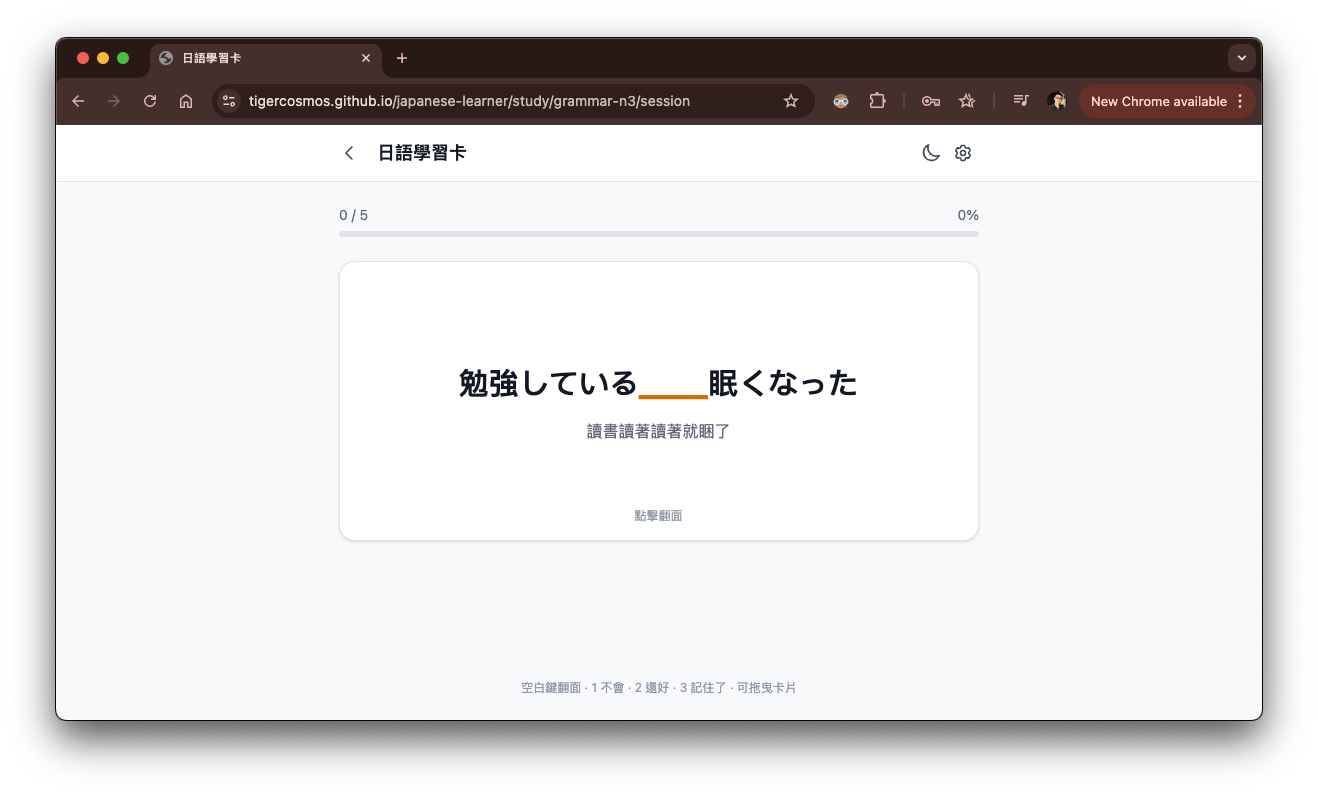
In this post, I’ll share how I used AI tools to build a Japanese learning app that fits my habits exactly. Once I had a learning tool tailored to me, studying also became more efficient. I’ll use my own flashcard app as an example: I use it to memorize vocabulary and practice grammar, and I kept tuning it until it felt just right.
¶ AI Tools
Let’s start with the AI tools we can use. Most people have tried chat-based assistants like ChatGPT or Gemini. Here, I’ll focus on AI tools that are closer to “writing code,” such as Codex and Claude Code. They are also referred to as AI coding agents.
Unlike general chat assistants, an AI coding agent actually does work for you: editing documents, modifying code, running system commands, and so on. For developers, it’s useful for adding features, fixing bugs, or building new systems. For non-programmers (designers, architects, language learners, etc.), you can also use it to build software by simply describing what you want in natural language, as if you were chatting. This approach is often called vibe coding: you tell the AI what kind of program you want, then iteratively adjust it through conversation until it becomes what you had in mind. Throughout the process, you rarely need to write code by hand, and you may not even need to review or understand the code.
Just describing it might sound magical and hard to imagine, so let’s try it in practice.
¶ Claude Code
Whether it’s Codex or Claude Code, both can be used for vibe coding. I’ll use Claude Code for the demo here, because Claude Code currently provides a desktop app for macOS and Windows, which is more friendly to non-developers. If you’re a developer, using the terminal CLI version is fine.
First, you’ll need to create a Claude account and subscribe to the Pro or Max plan. Then go to Claude’s desktop app download page and download the correct version for your operating system.
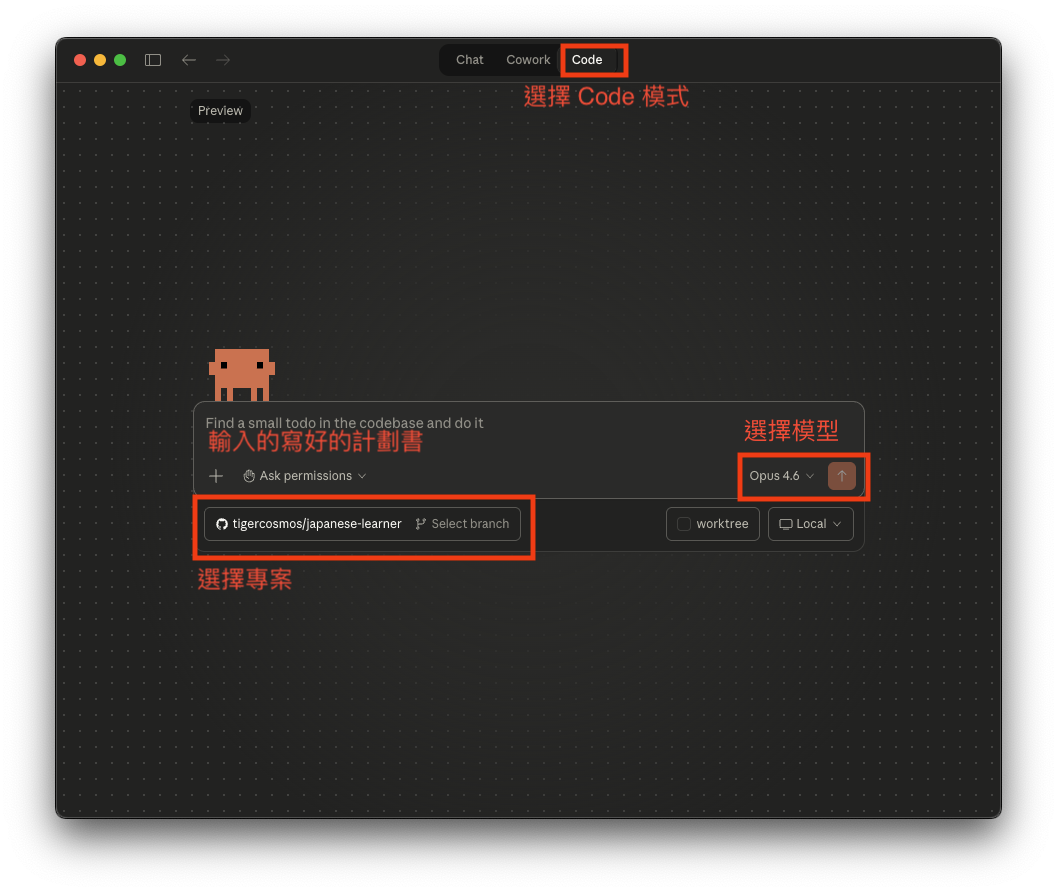
After installing the app, go to the “Code” view (you can switch from the top of the main window). In the bottom-left of the central text input, you can choose the project folder to use. Create a new folder; to follow this tutorial, you can name it japanese-app. Then try a prompt to get a feel for Claude, like “Generate a simple Japanese learning app for me.”
But if everything were that easy, it would be too good to be true, right? Play with Claude a bit and see what happens when you ask it to generate an app. As you can probably predict, the result won’t be great. Next, I’ll show you how to make your Japanese learning app look exactly the way you imagine.
¶ Building a Japanese Learning App
¶ Create a Plan
Once you have a vibe-coding tool installed, you can start using AI to develop software. In this process, whether you can write code isn’t necessarily the most important thing; what’s more important is having a clear product framework in your head.
You’ll be more like a product manager: define a feature list, sketch what each screen should roughly look like, and think about how users should operate it and what interaction experience they should get. The clearer you are, the less rework you’ll have later.
I recommend writing a product spec or plan first. For example, for the Japanese learning app I wanted to build, I started by listing the most critical requirements:
- This vocabulary app should let me memorize words, and it should support two quiz modes: show Japanese kanji and ask for Chinese, and show Japanese hiragana and ask for Chinese.
- This app should also let me practice grammar, and provide multiple quiz modes, such as: recall meaning from the grammar pattern only, fill in the grammar in an example sentence, or highlight the grammar in an example sentence, etc.
- The interaction experience should be similar to common learning apps on the market.
- The app should be able to create and manage its own database.
These are the most basic specs. You can also be more explicit about visuals and interaction. For example, you can specify whether you want a light theme or dark theme, and whether the card style should feel cute or minimal. The more specific you are, the more likely the AI will produce something you like.
The initial spec is extremely important, because it’s like laying the foundation for a building. If you’re only planning to build a small house, the foundation won’t be designed for a skyscraper. But if you lay the foundation properly at the beginning, future extensions and expansions become much smoother.
So, try to make the initial features and requirements as clear as possible to avoid large-scale refactors later. It’s not that you can’t change things, but it tends to become inefficient, and the code architecture can get messy and error-prone.
For example, when I built this app, my spec looked like the following. I originally wrote it in English. In the original Chinese version of this post, I used GPT to translate it into Chinese for readability; here I include the English version:
I want to build a flashcard application for learning Japanese, similar to an app like Quizlet.
Please write the development plan into plan.md first.
Also, tell me if anything is missing, and propose questions that need to be clarified.

## Basic Requirements

- A pure web app built with React
- All JSON data lives under the data directory; support filtering datasets by category or level
- Provide a basic spaced-repetition / memory algorithm and a shuffling mechanism
- Persist learning progress in browser storage

## Japanese Vocabulary

Used to study and quiz vocabulary.

The data format is JSON, for example:

{
    "name": "name of dataset",
    "category": "vocabulary",
    "level": "N3",
    "data": [
        {
            "id": "xxx",
            "japanese": "株式",
            "hiragana": "かぶしき",
            "simple_chinese": "股份",
            "full_explanation": "...."
        }
    ]
}

Each entry should support the following quiz modes:

- Show Japanese kanji only -> answer is Chinese
- Show Japanese hiragana only -> answer is Chinese
- Show Chinese -> answer is Japanese (full explanation is optional)
I can choose whether to use kanji or hiragana during quizzes.

## Grammar

Used to study and quiz grammar.

The data format is JSON, for example:

{
    "name": "name of dataset",
    "category": "grammar",
    "level": "N3",
    "data": [
        {
            "id": "xxx",
            "japanese": "うちに",
            "simple_chinese": "在~過程中/趁~",
            "full_explanation": "some example sentences..."
        }
    ]
}

Quiz modes include:

- Show Japanese grammar only -> answer is Simplified Chinese
- Show an example sentence with the grammar highlighted -> answer is Simplified Chinese
- Show Simplified Chinese translation -> answer is Japanese (full content optional)
- Show an example sentence with the grammar blanked out (remove the tested part) and show the Chinese translation -> answer is Japanese (full content optional)
Notice that I deliberately include fairly detailed technical constraints in the spec, such as using React and making it a pure front-end web app. These kinds of requirements are usually easier to articulate if you have some development experience. If you don’t know how to code at all, you can skip the technical details at first, but the direction of the AI output may be less controllable.
For example, if you only say “I want to build a vocabulary memorization app,” the AI might assume you want an iOS or Android app. Even if it chooses a web app, it might generate an architecture that requires a backend and a database. In my case, because I wanted to host it directly on the internet without setting up extra servers, I explicitly emphasized that it should be a pure front-end web app.
I also specified React, because it makes it easier for me to tweak the code myself later, or to have the AI modify it.
If you have no programming background at all, I recommend chatting with ChatGPT first. Describe the shape of the app you want, ask it to discuss and clarify requirements with you, and use it to fill in a few necessary technical concepts. You don’t need to learn in depth; understanding a few key distinctions is enough to write a clearer spec.
Also, think a bit further ahead. If you’re building a Japanese learning app, you’ll need learning materials to put into it. That means you should also think about what the data format should look like. If you have zero programming concepts, you can look at how commercial software lets regular users operate it. For instance, you can imitate Anki and define a CSV or TXT format. Here, I chose a slightly more “geeky” JSON format, which is a common data format used by developers.
Now you can open any text editor (Word, Google Docs, Notes, anything), copy the example above, and make your own modifications, such as the screen flow, visual style, or quiz mechanisms.
¶ Let the AI Execute the Plan
Next, you just need to copy and paste the plan you edited into Claude Code. For the model, I recommend selecting Opus 4.6 directly. It’s the most expensive, but it also performs the best. When you ask an AI to build an app from scratch, it’s better to use a smarter model; otherwise, your app may end up structurally unsound.
Then the AI will start planning software development according to your plan. You can skim it and see whether anything needs to be changed. The AI may also confirm some planning details with you.
After that, the AI will start running. During development, it will request various permissions; in most cases, you can simply approve them. But if it tries to delete files, read private documents, or you see the keyword rm (which indicates deleting files), be extra careful. If you’re not sure about an action, you can ask why it’s doing it, or look up what the command does first.
The AI will work non-stop to implement your plan. The process may take anywhere from a few minutes to tens of minutes. When it’s done, it will tell you it has finished. At that point, you can simply prompt: “Open the app for me to verify.” Even if you don’t know how to run the project yourself, the AI can open it for you. For a web app, it typically means opening a development URL in the browser, and you’ll see the app.
For example, you’ll see a page like this:
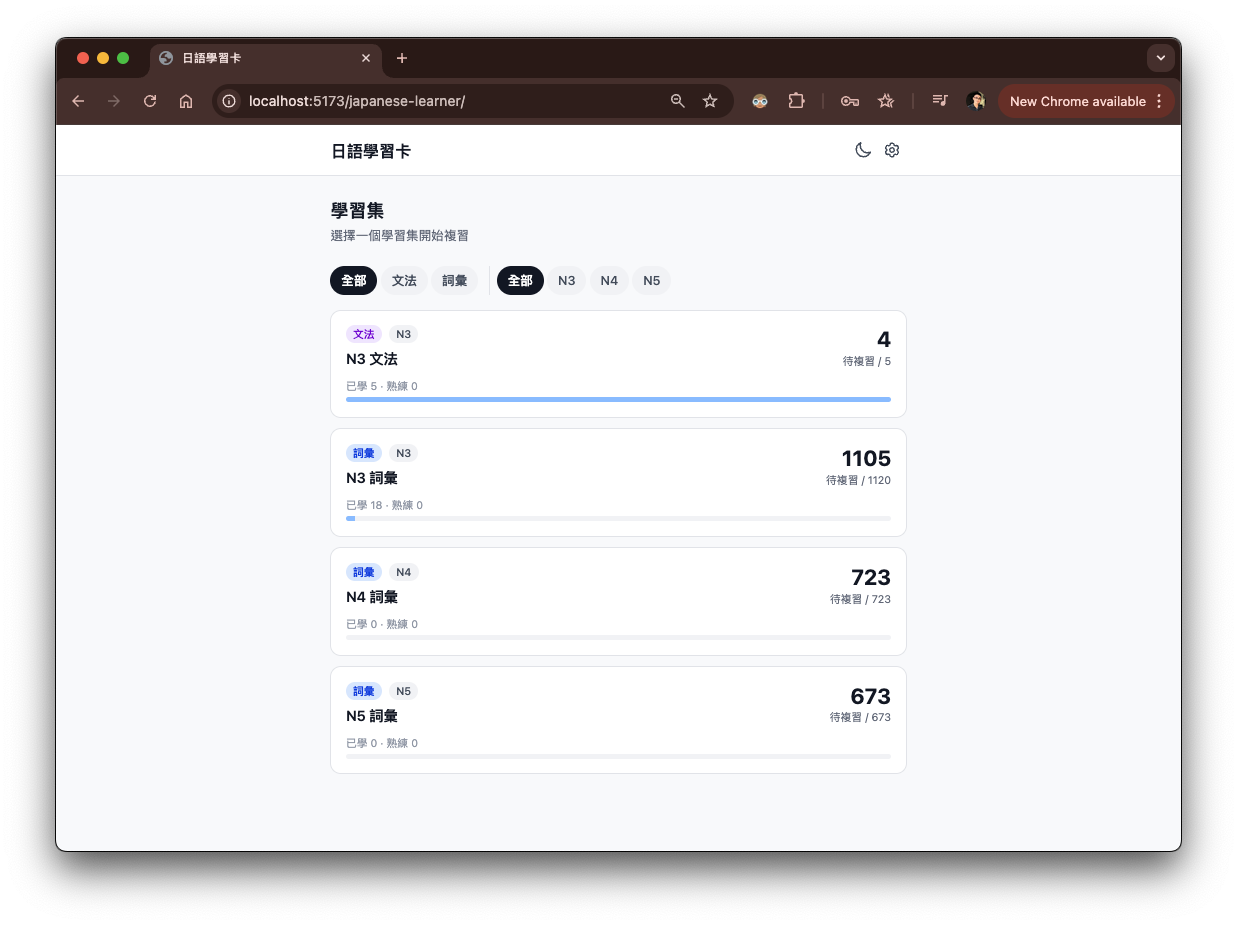
Or you can click the “preview” feature in the top-right of Claude Code; it will also open a browser window for your project.
¶ Iterate and Keep Tweaking
Next, go play with the app you just built. You’ll find many things differ from what you imagined: either you didn’t think of them when writing the spec, the AI didn’t implement them well, or you came up with new ideas while using it. In short, you’ll end up with a lot of things you want to change.
In my experience, beyond the original plan, I later added features such as text-to-speech to hear how Japanese is pronounced, swipe gestures for cards on mobile, and a dark mode to protect your eyes.
At this point, you can continue chatting with the AI in Claude Code. Explain clearly what you want to change, and the AI will implement the fixes one by one. After each change, you verify whether it did it correctly. Repeat this iterative loop until you have a version you’re happy with.
¶ Going Further
You may find that sometimes the AI makes the app worse and worse, or it spirals out of control. That’s when version control becomes especially important. Version control is like a time machine: you can always go back to an earlier version and restart from a state that was working.
You may also find that although you’ve built a web app, you don’t know how to put it on the internet. After all, the ultimate goal of a web app is to be publicly accessible. You’ll need to learn how to deploy a static website to a server.
Finding good Japanese learning data can also be important. You might scrape it from the web or ask the AI to generate it. Once you have the data, you still need to process it, improve it, automate it, and ensure it can be consumed by the app you built. I’m sure you’ll learn a lot along the way.
Even if you couldn’t code at the beginning, once you start using AI to build software, you’ll realize programming is actually fun. And sometimes, editing the code yourself is more efficient, and more interesting, than asking the AI. At that point, you’ll want to learn deeper programming skills, and even skills beyond programming. Beyond Just Coding! is a great introductory book.
¶ Conclusion
In today’s AI-powered world, software development is no longer exclusive to engineers. Anyone can do it with AI. In the past, when learning languages, we could complain about lacking environment, resources, or tools. But the times have changed. AI is the best teacher and the best helper. You can use it to learn languages by asking for translations, explanations, and example sentences, and you can even have it build personalized learning software for you.
And it’s not limited to language learning. AI can be applied to almost any field: software that analyzes stocks for you, a tool that tracks your expenses, a script that processes documents. AI can do all of it. The approach in this post applies to any scenario you can imagine.
¶ Sharing the Finished “Japanese Learning Cards” App
You can check out the finished project, “Japanese Learning Cards”. It’s free for all Japanese learners to use. The source code is fully open, and even the original development plan is in the repo. You can also read the commit history to see how I developed it over time.
I’ll keep updating this software. For the data, I currently have only finished the vocabulary part for N5-N3.
I’ve embedded “Japanese Learning Cards” in this post via an iframe, so you can play with it right here. However, if you’re on mobile, I recommend opening the link in a new tab for a better experience.
Japanese Learning Cards:
