Short String Optimization (SSO) in C++
C++ std::string is one of the earliest and most frequently used standard library components when learning C++. When studying it, we often start by understanding that a string is just a container—basically like std::vector<char>.
Let’s take a look at what std::string looks like internally. std::string is an alias of std::basic_string<char>. The basic_string structure is at least similar to the following: it has a pointer to a character array CharT, a size that records the current length, and a capacity that records the current capacity. On 64-bit x86, a string needs at least $8+8+8=24$ bytes.
struct {
    CharT* ptr;
    size_type size;
    size_type capacity;
};
But in reality, a string is not just a simple container. In fact, it has a special optimization for short strings: Short String Optimization (SSO).
Let’s use Quick C++ Benchmarks to see the results of running the following code.
const char* SHORT_STR = "hello world";

void ShortStringCreation(benchmark::State& state) {
  // repeatedly create a string
  // due to SSO, no new allocation is needed
  for (auto _ : state) {
    std::string created_string(SHORT_STR);
    // required to prevent the compiler from over-optimizing
    benchmark::DoNotOptimize(created_string);
  }
}
BENCHMARK(ShortStringCreation);

void ShortStringCopy(benchmark::State& state) {
  // create a string object once, then repeatedly assign/copy
  std::string x; // create once
  for (auto _ : state) {
    x = SHORT_STR; // copy
    benchmark::DoNotOptimize(x);
  }
}
BENCHMARK(ShortStringCopy);

const char* LONG_STR = "this will not fit into small string optimization";

void LongStringCreation(benchmark::State& state) {
  // long strings trigger allocation
  for (auto _ : state) {
    std::string created_string(LONG_STR);
    benchmark::DoNotOptimize(created_string);
  }
}
BENCHMARK(LongStringCreation);

void LongStringCopy(benchmark::State& state) {
  // re-use memory, so copying/assigning becomes faster
  std::string x;
  for (auto _ : state) {
    x = LONG_STR;
    benchmark::DoNotOptimize(x);
  }
}
BENCHMARK(LongStringCopy);
With GCC 11.2 + libstdc++ on a 64-bit x86 i3-10100 CPU, we get the following results:
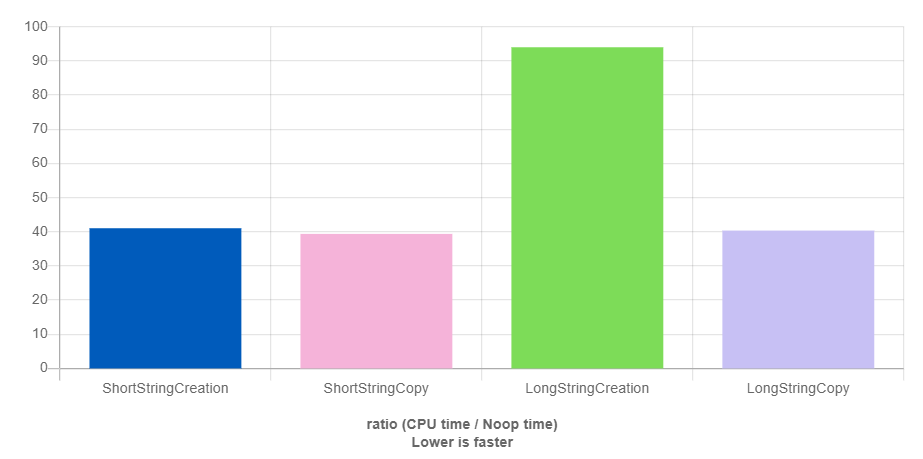
(Figure 1: performance comparison of creating/copying short vs. long strings using GCC + libstdc++)
The Y-axis in Figure 1 is relative runtime; lower means faster. You can see that creating a short string object is faster than creating a long string object. The main reason is that the string object contains an inline buffer for small strings. A long string might be handled as shown below: when the string is short, it stores the characters directly in the object’s stack space; when the string is long, it allocates heap memory to store the data. Typically the inline capacity is 16 bytes, and an implementation often uses a union to save space. That is why a string object’s size can become $8+8+16=32$.
struct {
    size_type size;
    size_type capacity;

    // union uses the largest member as the storage size; here it is 16
    union {
        CharT* ptr;
        std::array<char, 16> short_string;
    }
};
Depending on the compiler (GCC vs. Clang) and the standard library implementation (libstdc++ (GNU) vs. libc++ (LLVM)), results can differ. For example: how SSO is implemented, how memory copies are performed, how constructors/destructors behave, and so on. If you want to understand the differences, you may need to look into the compiler logic and the standard library implementation (e.g., GCC source or LLVM source). One important note: rather than guessing performance, the most reliable method is to run a benchmark yourself!
We can also do a small experiment to verify it. The following example1.cc can be used to observe when std::string uses the heap.
// example1.cc
#include <string>
#include <cstdio>
#include <cstdlib>

std::size_t allocated = 0;

void *operator new(size_t sz)
{
    void *p = std::malloc(sz);
    allocated += sz;
    return p;
}

void operator delete(void *p) noexcept
{
    return std::free(p);
}

int main()
{
    allocated = 0;
    std::string s("***"); // short string
    std::printf("stack space = %zu, heap space = %zu, capacity = %zu\n",
                sizeof(s), allocated, s.capacity());

    allocated = 0;
    std::string s2(s.capacity() + 1, '*'); // long string
    std::printf("stack space = %zu, heap space = %zu, capacity = %zu\n",
                sizeof(s2), allocated, s2.capacity());

    allocated = 0;
    s2.push_back('x');
    std::printf("stack space = %zu, heap space = %zu, capacity = %zu\n",
                sizeof(s2), allocated, s2.capacity());
}
Running it with Clang + libstdc++ gives:
$ clang++ -std=c++20 -stdlib=libstdc++ example1.cc; ./a.out
stack space = 32, heap space = 0, capacity = 15
stack space = 32, heap space = 17, capacity = 16
stack space = 32, heap space = 33, capacity = 32
The first string is short, so it uses the reserved inline storage, and you can see heap usage is 0. The second string stores a long string (one character longer than the inline capacity), so it triggers new to allocate heap memory; the heap usage is one more than capacity because a terminating null character (\0) is appended. When we push_back one more character onto the long string, the mechanism is similar to std::vector: it reallocates a heap buffer with doubled capacity.
Now, let’s run the same experiment with Clang + libc++:
$ clang++ -std=c++20 -stdlib=libc++ example1.cc; ./a.out
stack space = 24, heap space = 0, capacity = 22
stack space = 24, heap space = 32, capacity = 31
stack space = 24, heap space = 0, capacity = 31
This is an interesting result: libc++ reserves 22 bytes for SSO. For long strings, it does not allocate exactly the required length. Even when the string is just slightly longer than SSO (23 = 22 + 1), libc++ allocates a heap buffer of length 32. In fact, there is no single “correct” SSO approach. Different libraries—and even different companies—may have their own implementations.
If you are interested, here are some references:
